


Auction Bid Sniper for eBay
3.81.59K Reviews
App Specs
- Version
- 2.2.62
- Updated On
- License
- Free
- Downloads
- 500,000+
- Developer
- Myibidder.com
- Categories
- Shopping
- Platform
- Android
Screenshots
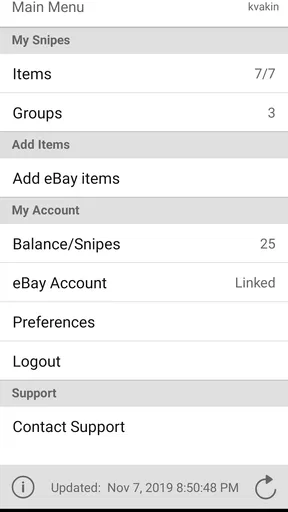
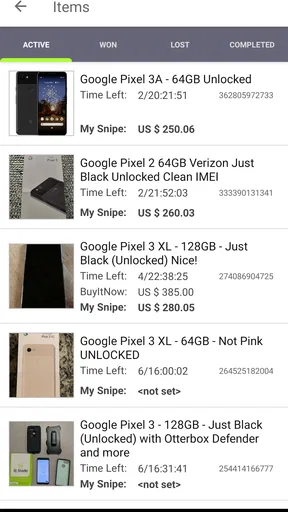
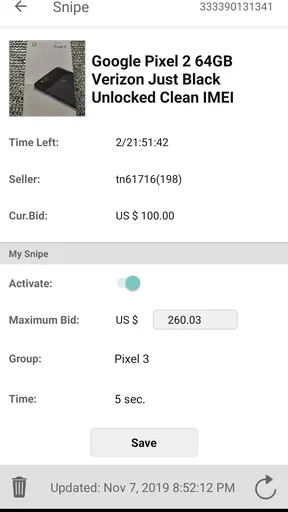
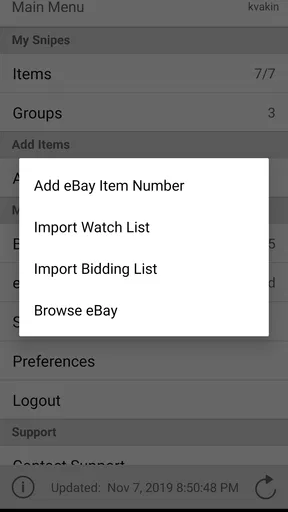
 Analysis by AppCompare
I find an auction-bidding app most useful when I can’t be watching a countdown. A last-second bid still depends on a reliable connection and a clear plan, though, so I treat automation as a way to manage timing—not as a promise that I’ll win. Auction Bid Sniper for eBay is built around that specific job: preparing a bid in advance and letting the app submit it near the auction’s close.
What last-second bidding changes
With ordinary manual bidding, I have to be available at the right moment, follow the auction, and decide whether to raise my offer while the clock is running. A sniper app changes that routine: I choose an item and a maximum bid beforehand, then leave the submission to the service. That can reduce the temptation to keep nudging my offer upward in response to other bidders.
The key decision is still mine. Before scheduling anything, I work out the highest total I’m genuinely willing to pay, taking shipping and the item’s condition into account where those details apply. A last-second bid doesn’t make an item cheaper by itself; it simply changes when my offer reaches the auction. If I set an impulsive maximum, automation can carry that mistake right to the finish.
Connectivity is part of the workflow
A scheduled bid is only useful if the app can communicate with the auction service at the relevant time. I would therefore set up an important bid while I have a dependable connection, check that the auction and amount are correct, and avoid leaving the whole task until the final seconds. A weak signal, a device switching networks, or a momentary service interruption can make an already time-sensitive task more stressful.
This also answers a practical question: should I close the app and assume everything is handled? I wouldn’t make that assumption without checking the status shown in the app. A bid prepared in advance is not the same thing as a confirmed bid, and I’d want to see that my intended auction and limit are still listed as expected before walking away.
Useful on the move, with a little preparation
The mobile format makes the most sense when I’m commuting, at work, or doing something that prevents me from sitting beside a browser until an auction ends. For example, if I spot a used camera accessory during a lunch break and the auction closes while I’m travelling home, I can prepare the bid then rather than trying to keep a live page open later. I still need to check the listing carefully: the exact model, condition, seller details, and delivery terms matter more than the convenience of the countdown.
Notifications can help me keep track of auctions, but I treat them as prompts rather than guarantees that I’ll have time to react. If I’m relying on an alert to make a fresh decision seconds before the close, I’m back in the same rushed situation as manual bidding. The stronger workflow is to decide my limit early and use a notification to check progress, not to invite a last-minute bidding war with myself.
Worth Reading Before You Choose

EA SPORTS FC Mobile 26 Is a Bigger Football Game, but It Takes Time

Flipboard Shows What News Apps Must Do Beyond the Feed

Switching to Android Auto Means Rethinking Your Driving Routine

Google Calendar Makes a Crowded Week Easier to Manage

Ludo King Makes the Most of the Minutes Between Plans

Baby Panda World Brings Quick Play to Modern Phones, but Its Game Library Feels Busy
The app is free to install, while in-app purchases range from $0.99 to $149.99 per item. I’d check what a paid option actually provides before spending, and I wouldn’t assume a purchase improves the chances of winning without understanding its terms. Auction outcomes still depend on competing bids, the listing, and whether the offer is accepted by the auction service.
Where it fits among auction-shopping options
Compared with bidding manually on eBay, the main appeal here is timing: I don’t have to be present for the closing seconds. Compared with simply saving or watching an item, a sniper workflow adds an action plan instead of leaving me to remember the auction later. Those alternatives may be better if I like to monitor prices, reconsider my budget as the auction develops, or make a deliberate live decision.
There is a trade-off. Manual bidding gives me a chance to reassess the listing and my interest as the end approaches, while a prepared bid puts more weight on the accuracy of my earlier judgment. I’d use the app for a straightforward listing I’ve already researched, not for an item with unclear details that I’m still trying to evaluate. If the auction’s terms or the product’s condition are uncertain, taking more time to inspect the listing is more valuable than shaving seconds off the bid.
Recovering calmly when something goes wrong
If I don’t see the result I expected, I’d first check the auction’s outcome and the bid history rather than immediately submitting another offer. A losing bid may simply mean someone was willing to pay more; it does not necessarily indicate a technical failure. If the app appears not to have handled a scheduled bid, I’d verify the selected item, maximum amount, and connection before relying on it for another closing auction.
For a high-value purchase, I would keep a backup plan that does not depend on frantic tapping: know the maximum I can afford, confirm the listing in advance, and decide whether I’m comfortable missing the item if the connection fails. That approach is less exciting than watching a countdown, but it prevents a technical hiccup from turning into an unplanned purchase or a rushed attempt to bid twice.
Who will get the most from it
This is a good fit for people who already understand eBay auctions and want help with the timing of bids. Collectors who follow several closing auctions, shoppers with busy schedules, and anyone who dislikes hovering over a countdown may appreciate being able to prepare an offer earlier. The app is less suitable for someone who prefers to negotiate through repeated live bids, wants to inspect every development before acting, or rarely buys through auctions.
It also calls for sensible account habits. Since the workflow involves an eBay account, I’d sign in only through the app’s normal setup and pay attention to the account and auction I’m using, especially if I switch between accounts. Myibidder.com develops the app, and the current version is 2.2.62. Its age rating is Everyone, but that doesn’t remove the need for an adult to make careful choices about purchases and account access.
First Impressions and Setup
Getting started with Auction Bid Sniper for eBay is a breeze. After downloading it from the App Store or Google Play, the setup process is straightforward. You’ll need to log in with your eBay account credentials, which might make you pause, but rest assured, the app takes your security seriously. They use encryption to keep your data safe, which is a huge relief in today’s world of cyber shenanigans.
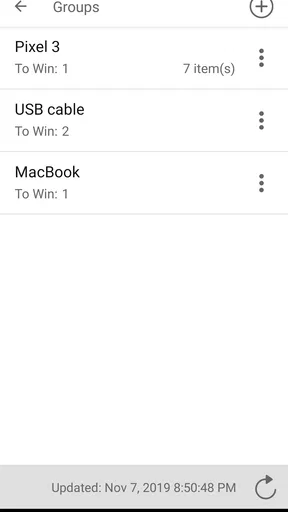
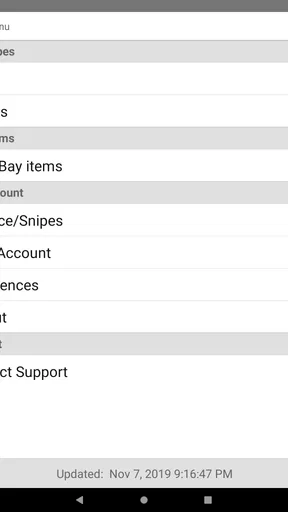
The user interface is clean and intuitive. I found it easy to navigate through the tabs, and the learning curve was practically non-existent. This app was clearly designed with the user in mind, making the whole experience smooth from the get-go.
How It Works
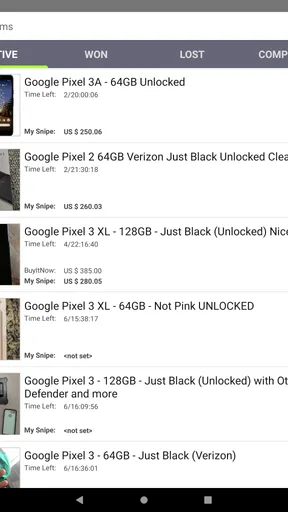
The magic of Auction Bid Sniper for eBay lies in its ability to place bids automatically. You simply select the auction you're interested in, set your maximum bid amount, and let the app handle the rest. It places your bid at the last possible moment, giving you the edge over other bidders who might be watching the auction closely.
I tested it out on a vintage vinyl record I had my eye on. As the clock ticked down, I felt a sense of calm knowing the app would take over. Sure enough, it placed my bid just seconds before the auction ended, and I won the item! The thrill was real, folks.
Features Galore
One thing I really appreciated was the range of features packed into this app. You can schedule bids, set notifications for auctions you're interested in, and even track your bidding history. It’s like having a personal assistant for all your eBay needs.
The notifications are particularly handy. I got alerts when an auction was about to end and when I had been outbid. This allowed me to adjust my strategy if needed. Plus, the app supports multiple eBay accounts, which is a game-changer if you’re a serious eBay enthusiast.
Performance and Reliability
In terms of performance, Auction Bid Sniper for eBay is rock solid. During my time using it, the app never crashed or lagged, and the bid placement was always spot on. This reliability is crucial because you don’t want to miss out on your item due to technical glitches.
The app developers seem committed to keeping it updated, which is always a good sign. Regular updates mean any bugs are squashed quickly, and new features are rolled out to enhance the user experience.
Who Should Use This App?
If you frequently shop on eBay and love the thrill of auctions, this app is definitely for you. It’s perfect for those who want to maximize their chances of winning without the stress of manual bidding. Whether you’re hunting for collectibles, electronics, or fashion items, this app can help you snag great deals with minimal effort.
However, if you prefer the hands-on approach and enjoy the excitement of live bidding, you might find this app takes away some of the fun. It automates the process, which can be a bit of a trade-off for some users.
Final Thoughts
In conclusion, Auction Bid Sniper for eBay is a fantastic tool for anyone serious about winning auctions. Its ease of use, range of features, and reliable performance make it a must-have for eBay enthusiasts. Whether you're a seasoned bidder or just starting out, this app can save you time and help you secure those hard-to-get items.
So, if you're ready to take your eBay game to the next level, give it a try. You might just find yourself winning more auctions than you ever thought possible! The app has a 3.8 average from around 7,200 ratings, with about 1,600 written reviews and over 500,000 installs. It has been available since March 22, 2011, and requires Android 7.0 or later. I’d treat those figures as a sign that it has an established audience, not as a guarantee that every scheduled bid will succeed.
A practical verdict on staying connected
My overall view is that this app is most useful when I’ve researched an auction, chosen a firm maximum, and can prepare everything before the closing rush. Its value is less about defeating every other bidder than about removing the need to be glued to a screen at a particular moment. Careful preparation matters more than last-second timing: verify the listing, check the scheduled bid, and keep a realistic fallback if your connection or the auction service lets you down.
If you enjoy live bidding or prefer to make a final judgment only when an auction is nearly over, the standard eBay experience may suit you better. If you want a mobile tool to organize bids around a busy day, this is a focused option worth considering. I’d start with a low-stakes auction, learn how its scheduling and notifications fit my routine, and only then rely on it for something I would be genuinely disappointed to miss.
Pros
- Automates last-second bids efficiently.
- User-friendly interface for easy navigation.
- Supports multiple eBay accounts.
- Customizable bid increments.
- Notifications for bid status updates.
Cons
- Requires internet connection to function.
- Limited free trial features available.
- No offline bidding capability.
- Subscription required for premium features.
- May not support all eBay regions.
FAQs for Auction Bid Sniper for eBay
What is Auction Bid Sniper for eBay and how does it work?
Auction Bid Sniper for eBay is an app designed to help users automatically bid on eBay auctions at the last possible moment, increasing the chances of winning the auction at a lower price. It works by syncing with your eBay account, allowing you to set a maximum bid amount and scheduling the app to place your bid in the final seconds of the auction.
Is Auction Bid Sniper for eBay safe to use with my eBay account?
Yes, Auction Bid Sniper for eBay is designed with security in mind. It uses encrypted connections to ensure your eBay credentials are protected. However, it’s always advisable to use strong, unique passwords and to follow eBay’s security recommendations to safeguard your account.
Can I use Auction Bid Sniper for eBay on both Android and iOS devices?
Auction Bid Sniper for eBay is available for both Android and iOS devices. You can download it from the Google Play Store for Android or the Apple App Store for iOS. The app offers a similar feature set across both platforms, ensuring a consistent user experience regardless of your device.
Are there any fees associated with using Auction Bid Sniper for eBay?
While Auction Bid Sniper for eBay may offer a free version with basic features, it typically provides premium plans for more advanced functionalities, such as unlimited snipes or multiple account support. These premium plans can come with monthly or annual fees, so it’s important to review the pricing details before subscribing.
What happens if my bid doesn’t win the auction?
If your bid placed via Auction Bid Sniper for eBay doesn’t win, you simply won’t be charged for the auction. The app only places bids up to your specified maximum, and if someone else bids higher, you won’t win the auction. You can try again on other auctions without any additional cost from the app itself.


